Docker

DevOps Engineer | Sharing insights on Kubernetes, Docker, CI/CD & Cloud | Writing to simplify complex tech
Docker we call as containerization
🔹 What is Docker?
Docker is an open-source platform that helps you build, package, and run applications in containers.
A container is a lightweight, portable unit that bundles:
Application code
Runtime
Libraries
Dependencies
This ensures your app runs the same everywhere (developer laptop, test, production, cloud).
🔹 Why Docker?
Without Docker, apps often face the classic problem:
"It works on my machine but not in production."
Docker solves this by putting everything the app needs into a container that can run anywhere.
🔹 Key Concepts
Image → A snapshot/blueprint of your app (e.g., Python + Flask app).
Container → A running instance of an image.
Dockerfile → A script to build an image (instructions on how to package the app).
Docker Hub → Public registry to share and download Docker images.
🔹 Advantages
✅ Portability → Runs the same on Windows, Linux, Mac, or cloud.
✅ Lightweight → Uses fewer resources than Virtual Machines (VMs).
✅ Faster deployment → Containers start in seconds.
✅ Isolation → Each container has its own environment (no conflicts).
✅ Scalability → Works well with Kubernetes and microservices.
🔹 Docker vs Virtual Machine
VM → Heavy, full OS per instance.
Docker Container → Lightweight, shares host OS kernel.
To develop application we have two types of process:
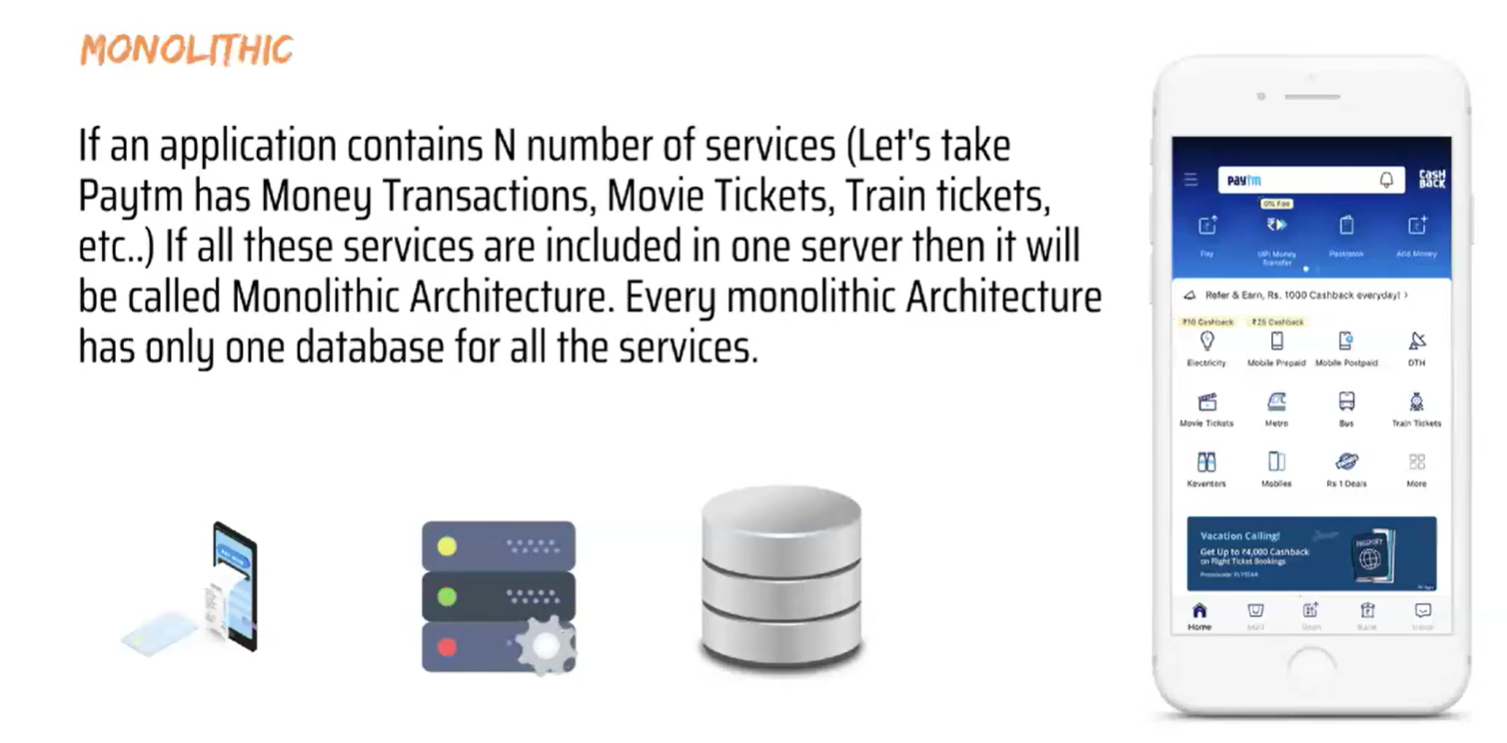
Monolithic :
A monolithic architecture (or simply monolithic) is a traditional software design style where the entire application is built as a single, unified unit.
Here’s a breakdown:
🔹 What it means
All features (UI, business logic, database access, etc.) are tightly coupled and packaged together in one codebase.
Typically deployed as a single executable or a single service.
🔹 Characteristics
Single codebase → All modules (authentication, payments, product catalog, etc.) are bundled together.
Single deployment → Even if you change a small feature, you must redeploy the whole application.
Tightly coupled → Components are highly dependent on each other.
Shared database → Usually one database is used for the entire app.
🔹 Advantages
Easy to develop initially (simple structure).
Straightforward testing (everything in one place).
Easier debugging (logs are centralized).
Good performance for small-scale apps (no network calls between services).
🔹 Disadvantages
Scalability issues → Can only scale the whole app, not specific parts.
Slower development over time (large codebase becomes hard to manage).
Limited flexibility → Can’t easily adopt new tech for just one part of the system.
Risky deployment → A bug in one part may bring down the entire system.
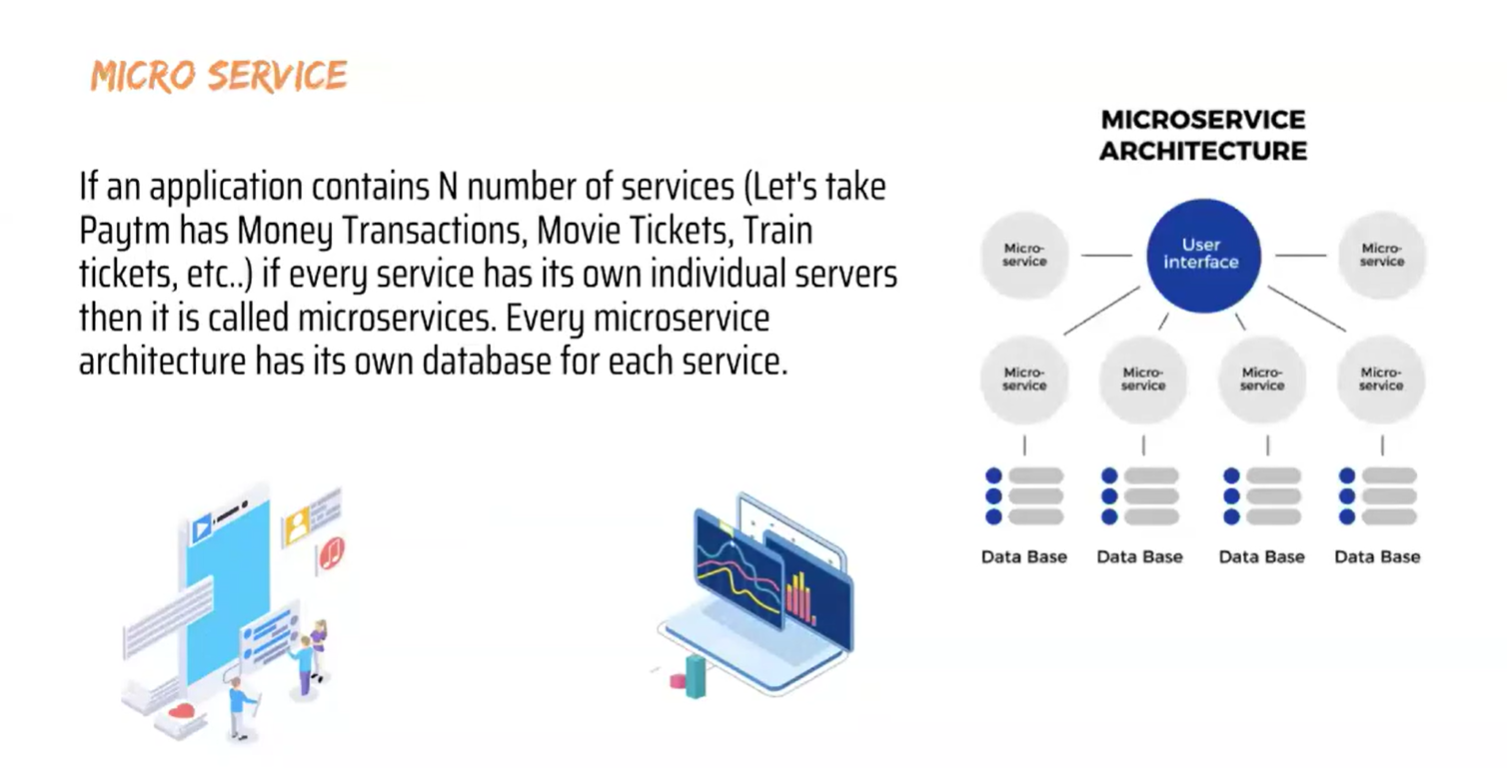
Microservices:
🔹 What is Microservices Architecture?
A microservices architecture is a way of designing software applications as a collection of small, independent services.
Each service focuses on doing one specific function well and communicates with other services using lightweight protocols (like REST APIs, gRPC, or messaging queues).
🔹 Characteristics
Independently deployable → Each service can be built, tested, and deployed without affecting others.
Loosely coupled → Services communicate but don’t depend tightly on each other.
Polyglot flexibility → Different services can use different programming languages, databases, or frameworks.
Decentralized data → Each microservice often has its own database (no single shared DB).
🔹 Advantages
✅ Scalability → You can scale only the services that need more resources (e.g., scaling "payment" service, not the whole app).
✅ Faster development → Small, focused teams can work on different services in parallel.
✅ Resilience → Failure in one service doesn’t bring down the entire system.
✅ Technology flexibility → Different services can adopt different technologies.
🔹 Disadvantages
⚠️ Complexity → Managing many services, deployments, and inter-service communication is harder.
⚠️ Operational overhead → Needs strong DevOps practices (CI/CD, containerization, monitoring, logging).
⚠️ Network dependency → More API calls across services → latency and failure handling needed.
How Docker Works Containerization/Architecture:
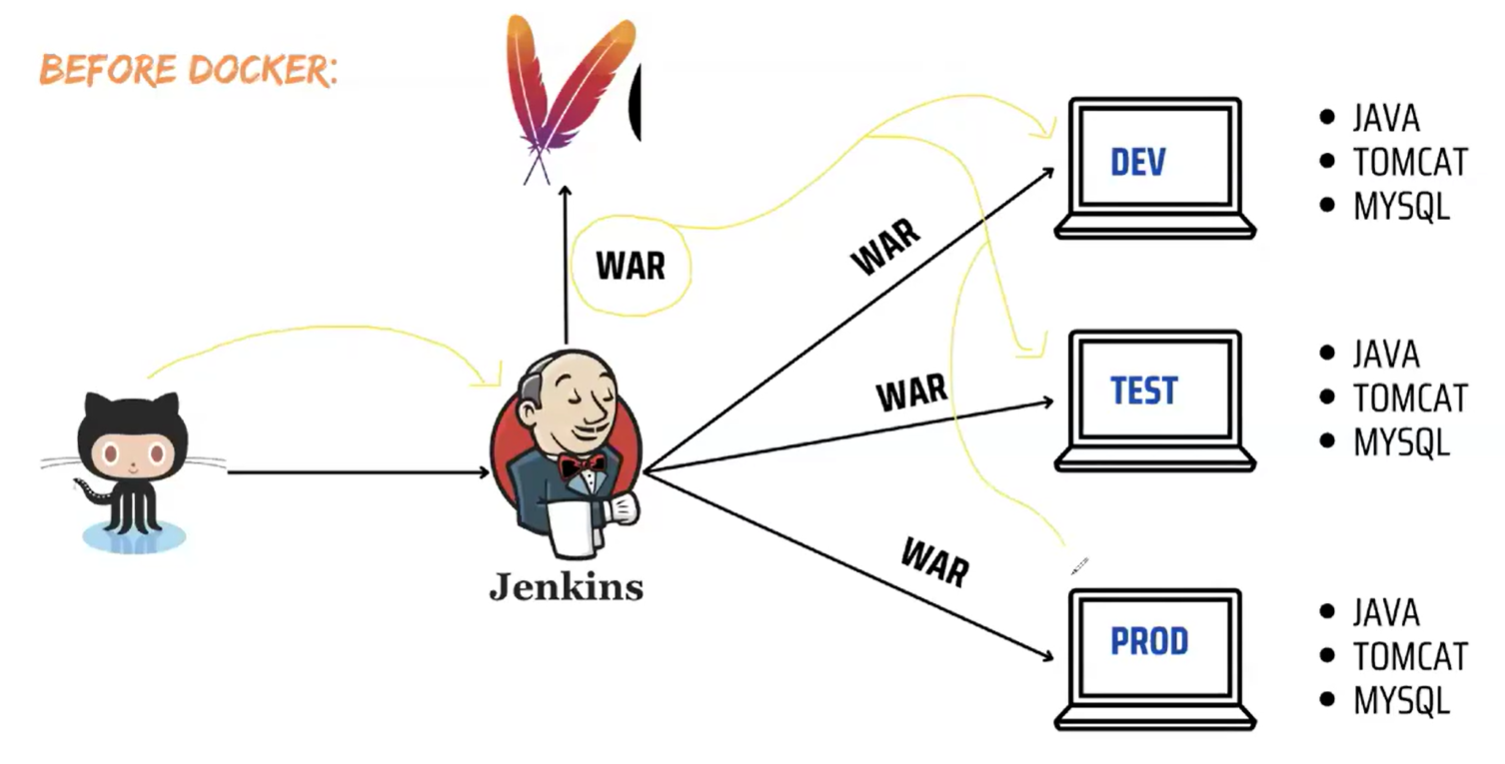
Before Docker we have to install all dependencies in all environments invidually
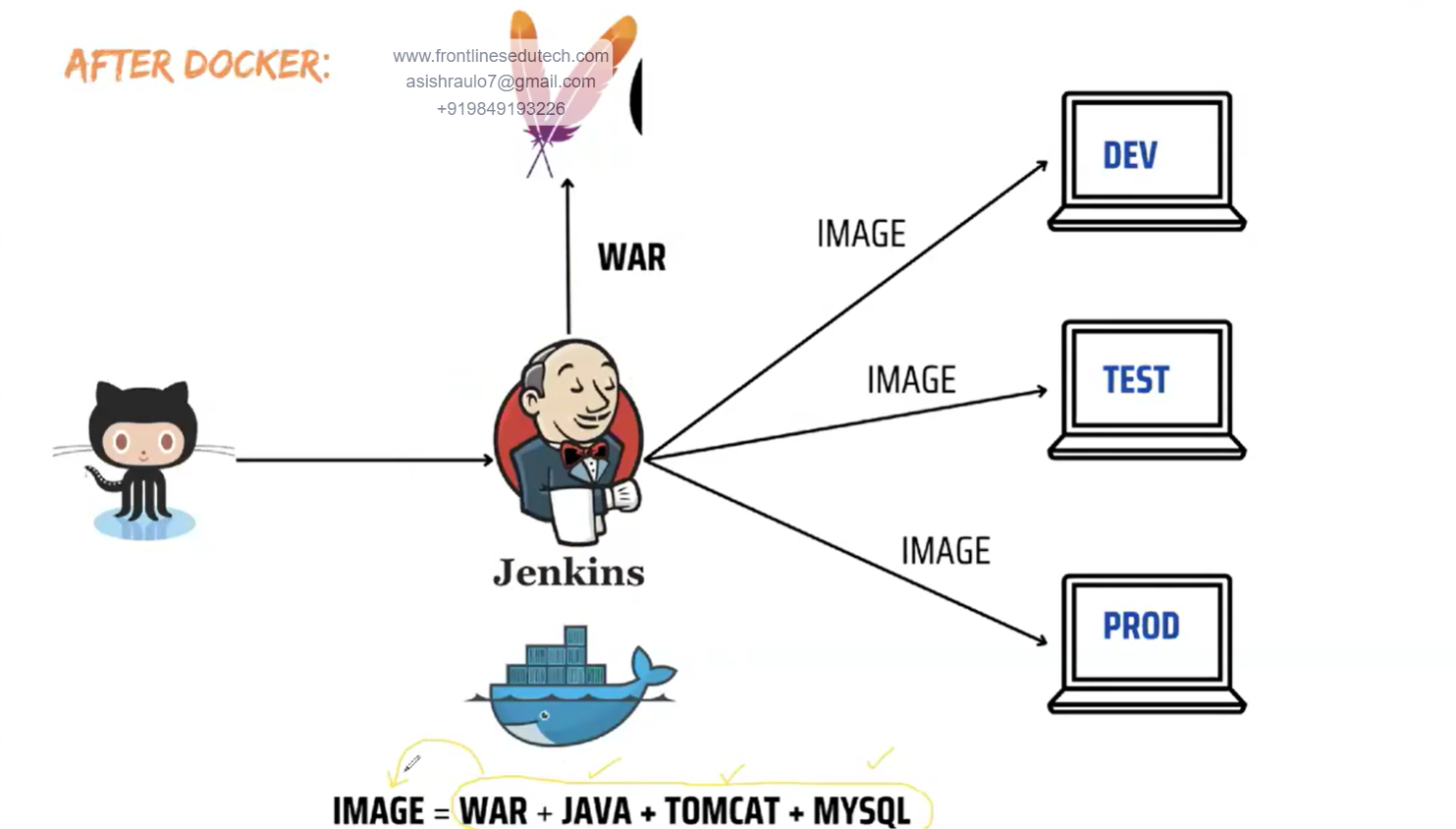
After Docker for application run we can create image along with his dependencies
eg: war+Java+Tomcat+Mysql = Image (That process called as Containerization)
🔹 What is Containerization?
Containerization is the process of packaging an application and all its dependencies (libraries, configs, runtime, etc.) into a container so that it can run consistently across different environments.
It ensures that your application works the same on developer laptop, test server, or cloud.
🔹 Benefits of Containerization
✅ Portability → “Build once, run anywhere.”
✅ Consistency → Eliminates “works on my machine” problem.
✅ Lightweight → Uses fewer resources than VMs (no full OS inside each container).
✅ Scalability → Easy to scale containers up/down in microservices or cloud environments.
✅ Faster deployment → Containers start in seconds vs minutes for VMs.
How Docker Works?
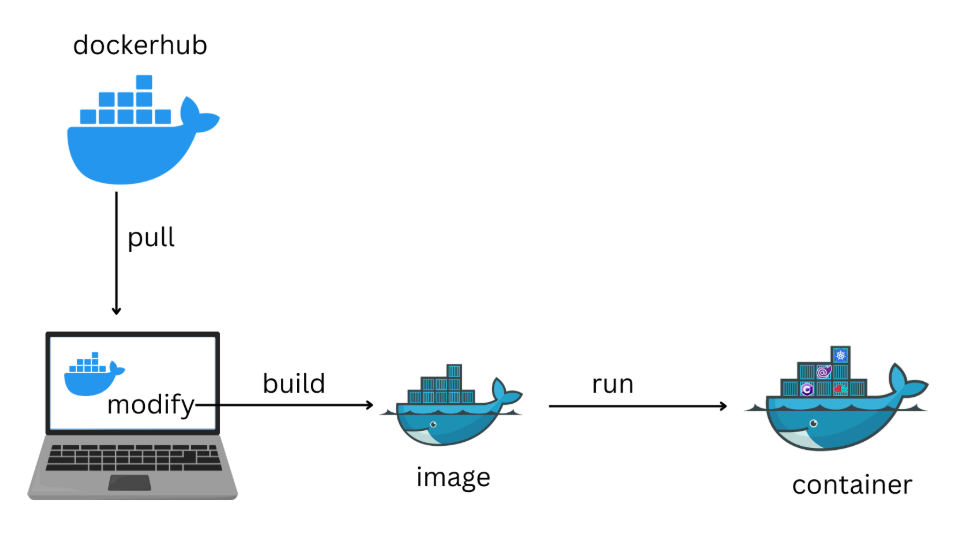
First we need to pull the base image from registry and make some modification using Dockefile. Once we build the Dockerfile, it will create docker image and we can run the image to create a container.
NOTE: To create a container, we need image.
Docker Architecture:
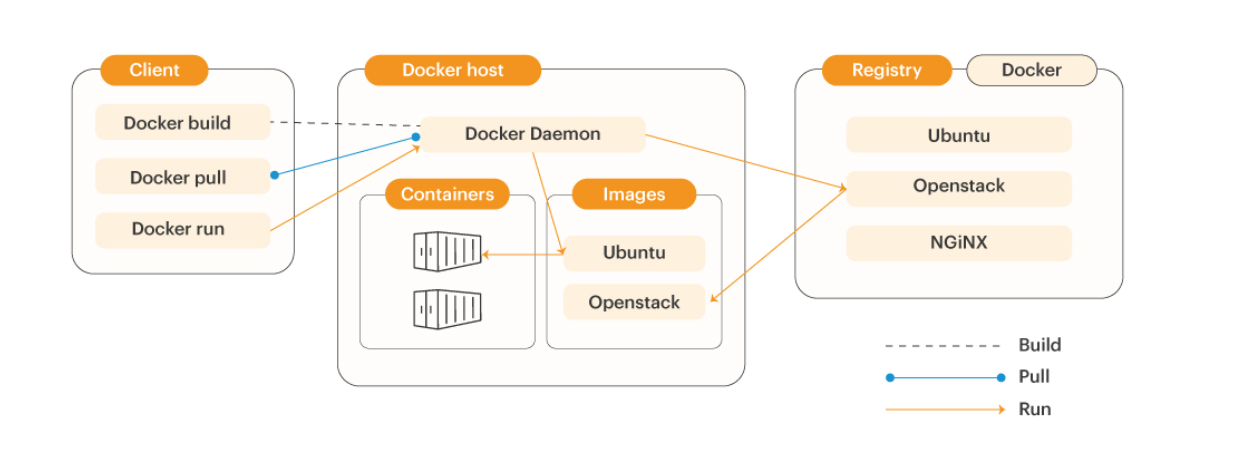
Docker architecture majorly contains this 3 components
Client
Host
Registry
Docker Client: The Docker client is used by users which interact with Docker, when we use such commands to create a container, start the container or delete the container, the client sends these commands to Docker Daemon to perform that particular action.
Docker Host: It is a system where we installed a docker. Ex: EC2 instance, Azure VM, Personal Lappy etc..
Docker Registry: It is used to store and share the docker images. In registry we can store our images on public or private.it completely stored in cloud.

🔹 What is Docker Daemon?
The Docker Daemon (
dockerd) is a background process that runs on the host machine and manages all Docker-related activities.It is responsible for:
Building images
Running containers
Managing networks & volumes
Communicating with registries (Docker Hub, private registries)
🔹 How it Works
The Docker Client (
dockerCLI) does not do the heavy lifting itself.Instead, the client sends commands (via REST API, socket, or HTTP) to the Docker Daemon.
The daemon executes those commands and returns the result.
🔹 Key Responsibilities of Docker Daemon
Container lifecycle management
Create, start, stop, pause, delete containers.
Example:
docker run→ Daemon creates and starts a container.
Image management
Build images from Dockerfiles.
Pull/push images to/from registries.
Networking
- Create and manage networks between containers.
Storage
- Handle volumes for persistent storage.
API Server
- Exposes the Docker Remote API so external tools (Kubernetes, CI/CD pipelines) can interact with Docker.
Docker install process:
Take an EC2 instance and launch install Docker in server (yum install docker -y)

Client : Where we execute commands
Is the docker daemon running? then start the docker systemctl start docker
docker images : to see images
docker ps : to see containers
if we have image and then if we run the image then container will create inside container application will run.
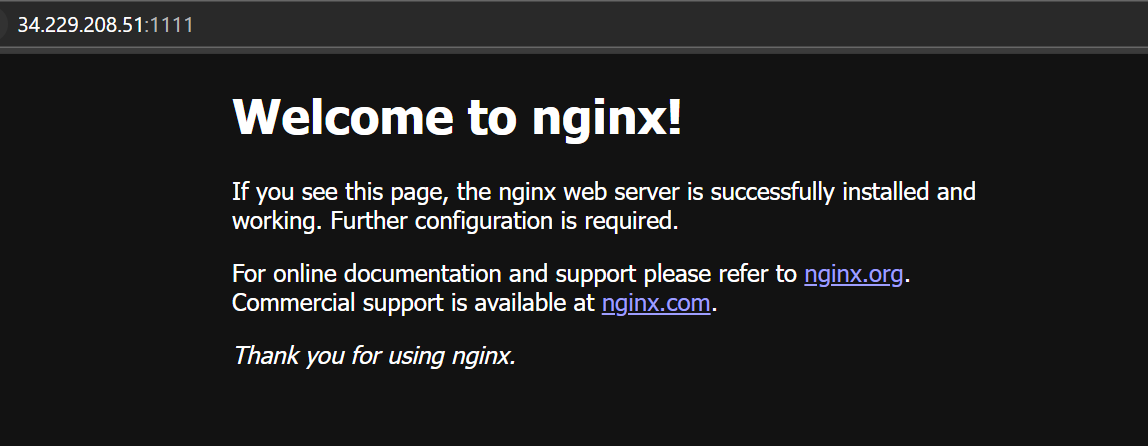
Lets pull some images from dockerhub
docker pull nginx —> to pull image (ngnix some application or web server)
For e.g:
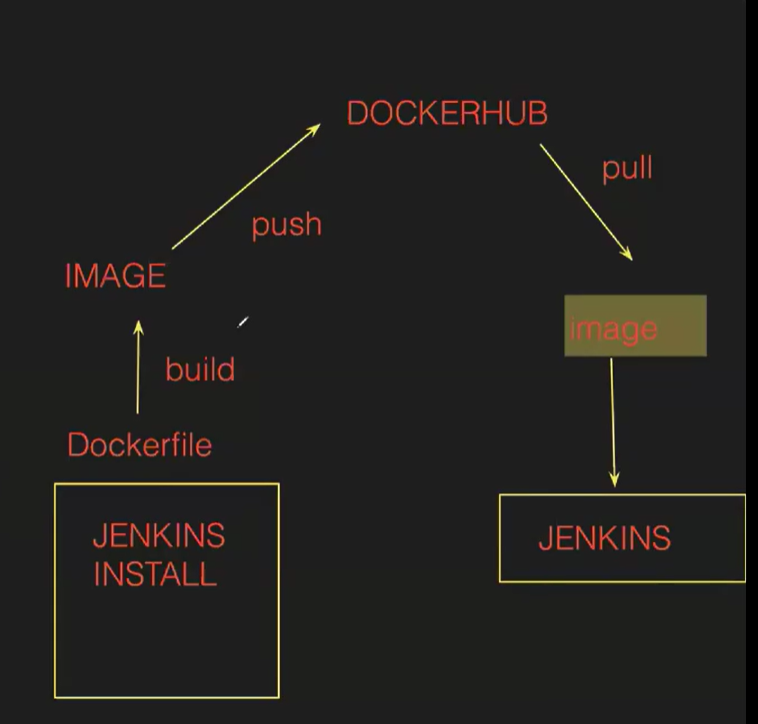
How images created and container:
DevOps engineer written a Jenkins docker file then build it will create image and will be push to docker hub then i pull the image from docker hub if i run the image Jenkins container will create .

Lets create container using Nginx image
docker run -itd --name devops -p 1111:80 nginx —→ ( to create container)
itd : interactive terminal **detached (**foreground and background process to always run in background)
-p : used for publishing the port number to access the application
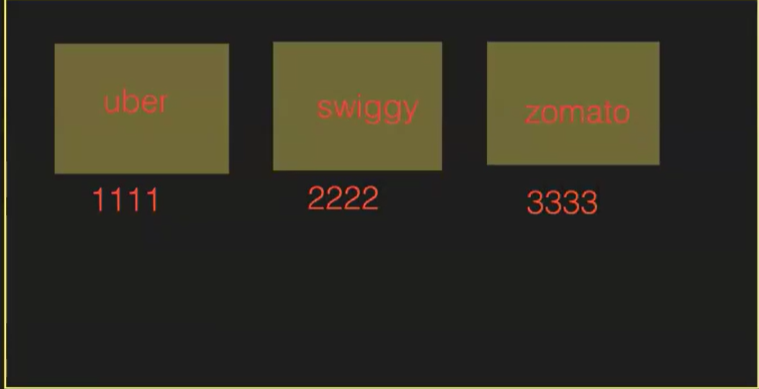
Ports are used to access the application we can give anything randomly
1111:Host port( we can take anything)
container port: 80: Based on image (web server ngnix port number is 80)
run the below command to create container

docker ps : to see containers

container was created as shown above
To access the application : Public ip of server and port number as shown below.